
Category Bar Chart
Grapher Template by Golden Software
116
341
Category Bar Chart
(Template by Golden Software).grt
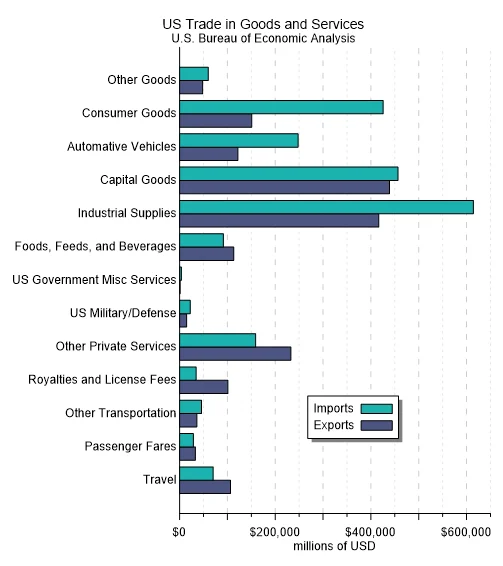
Clean and practical, this Category Bar Chart makes it easy to compare values across multiple discrete groups in a clear, side-by-side layout. In this template, horizontal bars represent different trade categories, with two color-coded bars per group highlighting imports and exports. Because both values share the same axis, it’s easy to spot differences in magnitude within each category and quickly identify any trade imbalances.
This horizontal layout enhances readability, especially when labels are lengthy or numerous. By placing categories along the vertical axis instead of squeezing them along the bottom, the chart stays organized and easy to scan.
With this template, it’s immediately apparent which sectors contribute most to overall trade volume and where imports outweigh exports. A consistent scale across all categories also ensures comparisons remain accurate and easy to interpret.
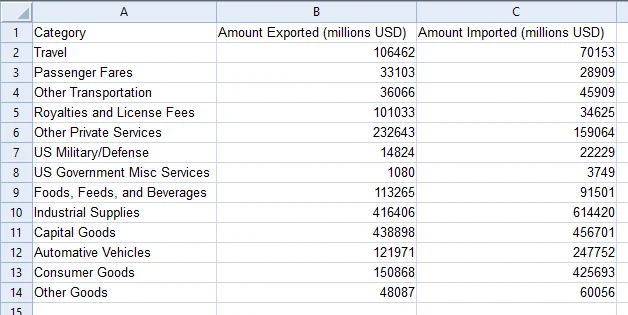
The data for this template can be found below which you can download and adjust using your own data:
Industry Focus: Economics, Finance, Public Policy, Business, Analysis, Operations Reporting, Supply Chain Management
Graph Features: Bar
Instructions
To use this template in Grapher:
- For the best experience, structure your data in the same format shown on this page or use the example files if provided above.
- Click Download Template at the top of this page to download a GRT template file.
- In Grapher, click File | Open and open the file.
- Click Template | Populate Template to load your own data into the template.
Primary Categories: Categorical, Relational
Industry Focuses: Analysis, Business, Economics, Finance, Operations Reporting, Public Policy, Supply Chain Management
Type: Bar